Ours works alongside your practice software without connecting to it: it takes a message, and your front desk books the visit. Booking on the call can be added for your own online calendar, like Cal.com, Calendly or GoHighLevel. Ours does not write into Dentrix, Open Dental, Eaglesoft or Curve, so ask any provider exactly how bookings reach your schedule before you sign anything.
It's a fair first question, and the honest answer is simple: you can start without touching your practice software at all.
"Ours" here means our AI receptionist for dental offices. Other products connect in other ways, so the questions further down are written to work with any provider.
Three levels of connection
| Level | What happens | Good for |
|---|---|---|
| Messages | Each request reaches your front desk to call back and book | Starting simply, with your team in control |
| Online calendar | Booking on the call, into your own Cal.com, Calendly or GoHighLevel calendar. With ours, an add-on for later. | Practices that already have their own online calendar |
| Practice software | A direct link into Dentrix, Open Dental, Eaglesoft or Curve. Some providers offer this. We don't today. | Practices that need bookings written straight into the practice system |
Starting simple
To start, the AI receptionist doesn't need to connect to your practice software. Each request goes to your front desk as a message. Your team calls the patient back and adds the visit to the schedule like any other request.
This isn't a lesser option. It means no IT project, no access to your patient database, and a person booking every visit while you get to know how the receptionist handles calls.
Online calendars
If you have your own online calendar, like Cal.com, Calendly (paid plan) or GoHighLevel, booking on the call can be added later. Then patients only hear times that are really free, and your calendar sends the confirmation email.
You'll also see this sold as "AI appointment scheduling". The phrase only means something when a calendar is connected. Without one, any AI receptionist is taking a request, not making a booking, so ask which of the two you're being offered.
An example call with booking switched on, made up for a demo practice:
- Patient:Can I come in next week? Mornings are best.
- Receptionist:I have Tuesday at 8:30 or Thursday at 10:00. Which would you like?
Dentrix, Open Dental, Eaglesoft and Curve
Every practice's setup is a little different. We don't connect to Dentrix, Open Dental, Eaglesoft or Curve today. Your front desk enters each visit the way they do now, from the message.
If you need bookings written straight into your practice system, you need a different product. Our buyer's guide covers how to check a "books into your software" claim before you sign.
Questions to ask about any connection
- Does it check live availability, or a copy that can go out of date?
- Who confirms new bookings, and can that change once you trust it?
- How are appointment types handled? A new-patient exam, a cleaning and an emergency visit need different lengths and sometimes different providers.
- What happens to moves and cancellations, and does the freed slot open up again?
- What happens if the connection fails? The call should still end with the patient looked after and your team told.
- Is the connection covered by the business associate agreement? It carries patient information too. See five privacy questions to ask.
Then ask to see it, not just hear about it: a test booking arriving in your own schedule. Our post on how to choose an AI dental receptionist has test calls and questions to put in writing.
If you add booking later, set up your appointment types first
Before booking is switched on, decide which appointments the receptionist may book, and how long each takes: new-patient exams, cleanings, emergency visits, consultations. Note which providers do which, and any slots you keep free, such as same-day emergency time. A clear list makes the receptionist's job, and your team's, much easier.
What your team sees either way
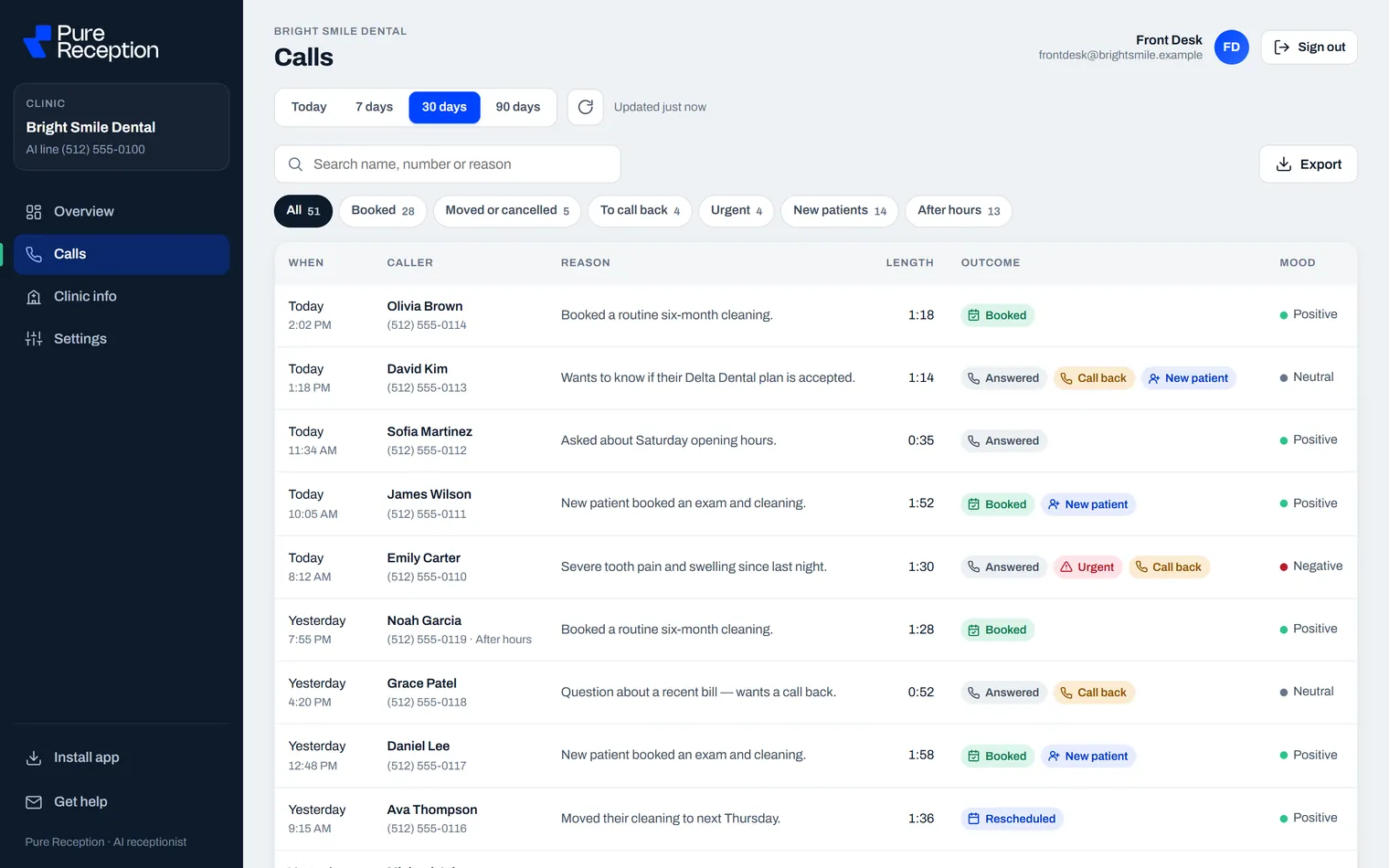
- Every request to book, move or cancel, with the call it came from.
- The recording, a written transcript and a short summary of each call.
- Alerts for urgent calls and call-backs.
Bring your setup to a call
Tell us which software and calendar you use, and we'll tell you plainly what ours can and can't do with it. Book 15 minutes with Sam (short for Ibtisam), the owner. Meanwhile, our guide to what an AI dental receptionist is covers the rest of what to look for.
Common questions
Does an AI receptionist work with Dentrix?
Ours works alongside Dentrix without connecting to it: it takes a message, and your front desk books the visit in Dentrix as usual. There is no direct link into Dentrix today.
Does it work with Open Dental, Eaglesoft or Curve?
The same applies: it takes a message, and your front desk books the visit in your system as usual.
Can it book into Google Calendar?
Not directly. Booking can be added through an online calendar of your own, such as Cal.com, which can sit on top of a Google calendar. To start, it takes a message instead.
Do patients get a confirmation?
Only when booking is switched on: then your own calendar sends the confirmation email. To start, your front desk confirms the visit when they call the patient back.
Last checked: 14 November 2026.